
Webflow vs WordPress: Which Platform Is Right for Your Website in 2025?

Choosing the right platform to build and manage a website isn’t just a matter of preference; it directly affects development workflow, performance, scalability, and how efficiently your team can maintain the site over time.
WordPress has been the industry standard for nearly two decades, while Webflow is gaining traction for its visual-first approach and all-in-one infrastructure.
Both platforms have their place. The key is knowing where each excels, where it falls short, and how those differences align with your specific project requirements.
This comparison cuts through marketing claims and focuses on what actually matters: functionality, flexibility, technical limitations, and long-term viability.
1. Design and Front-End Control
Webflow
Webflow is engineered for pixel-perfect visual design. It gives front-end developers and designers full access to layout, animations, typography, and responsiveness—all via a visual canvas that outputs semantic code.
Advantages:
Native support for Flexbox, Grid, and CSS variables
Custom breakpoints and visual control over responsiveness
Code export allows handover to developers or use outside Webflow (static HTML/CSS/JS)
Clean, unbloated front-end output without additional theming frameworks
Limitations:
No direct access to manipulate raw HTML (e.g., injecting arbitrary server-side code)
Component reuse is improving but still lacks some of the abstraction tools developers are used to
WordPress
WordPress relies on themes and page builders (Elementor, Divi, Gutenberg) for design. Design flexibility depends on the theme architecture or builder used.
Advantages:
Can build completely custom themes using PHP and ACF (Advanced Custom Fields) or FSE (Full Site Editing)
Builders now offer drag-and-drop functionality with responsive control
Thousands of pre-designed themes and UI libraries
Limitations:
Many themes include heavy CSS/JS libraries, increasing load time
Clean front-end markup often requires a custom build or professional development
Verdict: Webflow excels in modern, standards-based front-end development out-of-the-box. WordPress requires more manual control for code cleanliness.
2. Content Structuring
WordPress
WordPress is a full-featured content management system built to handle structured and unstructured content at scale.
Strengths:
Highly flexible with custom post types, taxonomies, custom fields, and role management
Native WYSIWYG and block editor (Gutenberg)
Ideal for content-rich websites, magazines, directories, or dynamic content
Drawbacks:
Reliant on third-party plugins for content relationships or complex field control
Backend interface can become cluttered with too many plugins or admin menus
Webflow
Webflow’s CMS is designed for structured, repeatable content (collections), typically managed through a visual interface.
Strengths:
Easy to set up and visually bind CMS content to design components
Collection-driven templates simplify updates
Perfect for blogs, case studies, portfolios, and directories with limited relationships
Drawbacks:
Limited to predefined collection fields (up to 60 fields per collection, up to 10,000 items per site on higher plans)
No built-in relational database features (e.g., many-to-many relationships, advanced filters without JavaScript workarounds)
Verdict: WordPress is more extensible for large or complex content structures. Webflow CMS is excellent for lightweight, well-defined content types.
3. SEO and Technical Performance
Webflow
Webflow was built with performance in mind and follows modern SEO best practices natively.
Strengths:
Auto-generated XML sitemap and clean semantic HTML
Fast-loading pages with CDN hosting and built-in SSL
Granular control over meta tags, Open Graph, canonical URLs, and alt attributes
Easily passes Core Web Vitals assessments
Limitations:
Lacks plugin support for advanced SEO use cases (e.g., programmatic schema, content optimisation tools)
Dynamic 301 redirects, structured data injection, and multi-language SEO require manual setup or workarounds
WordPress
SEO in WordPress is as powerful as your plugin stack and developer expertise.
Strengths:
Mature SEO plugins (Yoast, RankMath) provide robust control
Easy integration with analytics, schema, hreflang, and redirects
Full server access allows implementation of server-level SEO optimizations (e.g., caching layers, .htaccess rules)
Limitations:
Performance is dependent on theme and plugin quality
Without configuration, sites can suffer from load issues, plugin bloat, and technical SEO errors
Verdict: Webflow is fast and SEO-ready out of the box. WordPress offers more control and tooling for advanced SEO strategies.
4. E-Commerce Capabilities
WooCommerce (WordPress)
WooCommerce is the most widely used e-commerce engine globally and offers robust extensibility.
Strengths:
Full control over products, taxes, shipping, coupons, memberships, and subscriptions
Large ecosystem of payment gateways and add-ons
Suitable for scaling to enterprise-level stores
Limitations:
Requires regular maintenance, security updates, and performance optimization
Admin dashboard can become cluttered and complex
Webflow E-Commerce
Webflow’s e-commerce offering is tightly integrated into its design and CMS system.
Strengths:
Visual control over product templates and checkout design
Ideal for design-first small product catalogs
Limitations:
No support for subscriptions, user accounts, or multi-currency (natively)
Transaction limits, SKU limits, and feature gating based on pricing tier
Limited payment gateway support (Stripe, PayPal)
Verdict: WooCommerce is far more versatile and scalable. Webflow is viable for simple, small-scale stores where aesthetics are paramount.
5. Hosting, Security, and Maintenance
Webflow
Webflow provides fully managed hosting on Amazon Web Services (AWS) with a global CDN.
Strengths:
No need for hosting configuration or security setup
Daily backups, Includes SSL, versioning, and auto-scaling built-in
Great uptime and global content delivery
Limitations:
No access to server-side configuration or server logs
No native support for headless architecture or backend logic
WordPress
WordPress can be hosted anywhere—from shared cPanel hosting to enterprise-grade cloud infrastructure.
Strengths:
Full control over backend logic, server environment, and deployment
Can be used headlessly with REST or GraphQL APIs
Limitations:
Requires technical setup for caching, firewalls, backups, and malware protection
Frequent plugin/theme updates are required to avoid vulnerabilities
Verdict: Webflow provides worry-free hosting for brochure and marketing sites. WordPress is better for complex or custom infrastructure.
6. Pricing Considerations
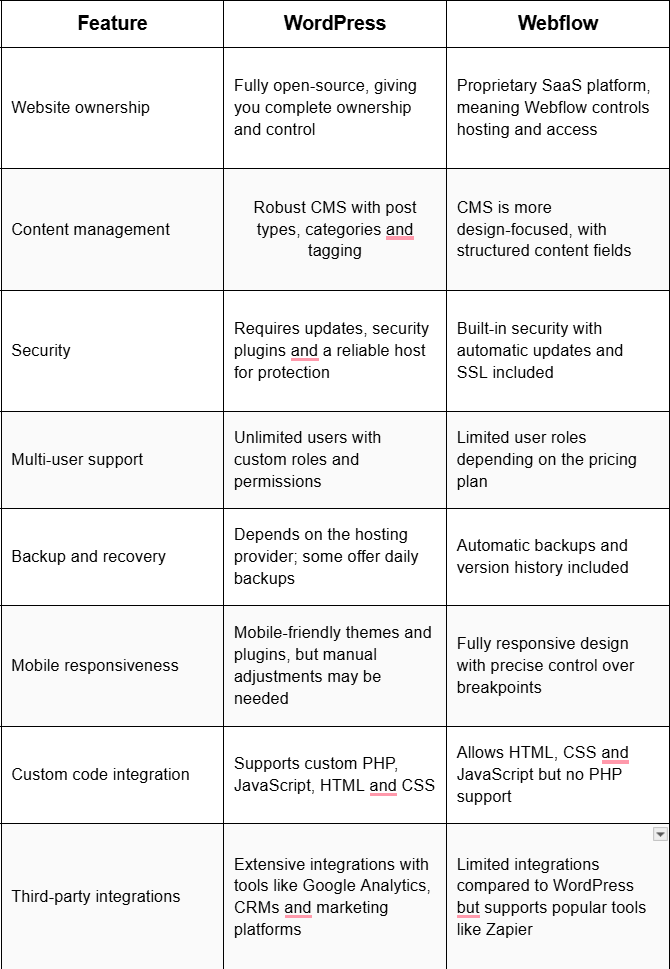
Verdict: WordPress can be more cost-effective for developers who manage their stack. Webflow is more predictable for non-technical users or design studios with recurring site needs.
Conclusion
When to Use Webflow
You need fast turnaround on visually stunning websites.
You want to avoid managing hosting, servers, and plugin compatibility.
Your content model is simple and structured (blog, portfolio, brochure site).
Your team is design-led rather than development-led.
When to Use WordPress
You require extensive content management, dynamic filtering, or relational content.
Your site will evolve into an app, membership system, or requires custom integrations.
You want control over hosting, backend logic, and long-term scalability.
You need a robust e-commerce platform with advanced features.
Ready to Build the Right Website for Your Business?
Choosing the right platform is a strategic decision that directly affects your website’s performance, scalability, and long-term maintainability. At XDesigns Advertising, we combine deep technical expertise with a results-driven approach to ensure your website is built for growth—functionally and visually.
Book a free strategy session today and get clear, expert recommendations tailored to your goals, use case, and budget.